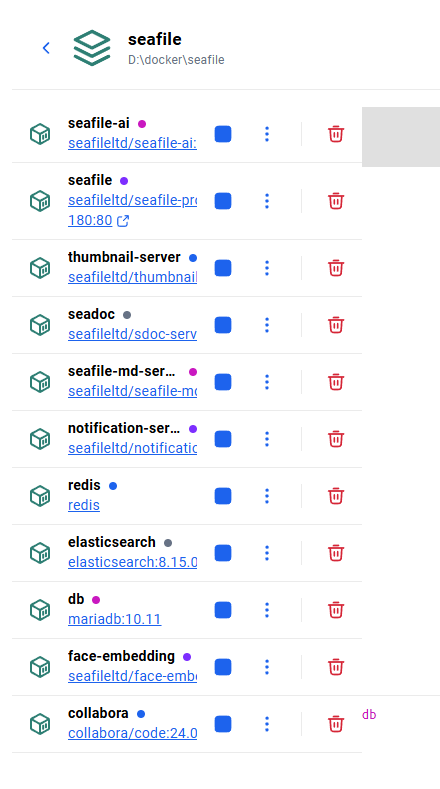
首先感谢这个帖子,从nginx配置文件找到了调用seadoc的配置语句。
Seafile 13专业版使用nginx配置https实现公网域名访问并启用onlyoffice - 经验分享 - Seafile 用户论坛
一、前言
云盘服务如果暴露在公网首先会被恶意IP扫描,其次家宽会被警告需要备案。
之前使用seafile代理的时候,可以限制useragent,请求方法、域名等等。
曾经尝试研究caddy的配置,将caddy容器config路径映射到宿主机,但是无论如何修改Caddyfile.autosave。重启后,总是会恢复到默认配置。
然后是在部署中遇到了各种小问题,将解决方法与大家分享一下。希望对同样需求的人提供一点点帮助。
建议一步一步操作,每次只改动1-2个配置,这样出现问题排查问题会更准确。
二、基本部署
1:按照官方手册,部署默认配置。
https://cloud.seafile.com/wiki/publish/seafile-manual/hk5G/
建议只修改最基本的配置,比如下面几个变量值。
SEAFILE_SERVER_HOSTNAME=地址/域名
JWT_PRIVATE_KEY
SEAFILE_MYSQL_DB_PASSWORD
INIT_SEAFILE_MYSQL_ROOT_PASSWORD
INIT_SEAFILE_ADMIN_EMAIL=
INIT_SEAFILE_ADMIN_PASSWORD=
部署成功后,使用SEAFILE_SERVER_HOSTNAME中定义的域名或IP访问确保基本组件工作正常。(上传下载、SDOC编辑、知识库编辑。)
2:变更端口。
一般家用宽带80是不会开放的,我个人会选择50000之后的端口。
.env中的配置
SEAFILE_SERVER_HOSTNAME=地址/域名:50000
改了端口之后,就要修改caddy.yml中的端口映射配置。
    container_name: seafile-caddy
    ports:
      - 50000:50000
重新创建容器,确保地址/域名:50000能正常使用。(上传下载、SDOC编辑、知识库编辑。)
3:增加ONLY OFFICE扩展
同样还是参考官方手册
https://cloud.seafile.com/wiki/publish/seafile-manual/7Y75/
有两个地方要注意:
官方手册下载的yml文件第一行有三个…建议删除。
如果加了端口,会造成ONLYOFFICE调用失败,需要修改caddy.yml中的端口配置。
端口问题
onlyoffice.yml中配置引用了SEAFILE_SERVER_HOSTNAME变量导致配置文件最终为:地址/域名:50000:6233。造成ONLYOFFICE调用失败。
onlyoffice.yml配置:
    labels:
      caddy: ${SEAFILE_SERVER_PROTOCOL:-http}://${SEAFILE_SERVER_HOSTNAME:?Variable is not set or empty}:${ONLYOFFICE_PORT:-6233}
      caddy.reverse_proxy: "{{upstreams}}"
最直接的方法就是不用变量直接修改onlyoffice.yml配置,比如:
caddy: http://地址、域名:6233
或者在.env中,增加一个ONLYOFFICE_HOSTNAME的配置,将不带端口的域名写进去。
onlyoffice.yml配置:
    labels:
      caddy: ${SEAFILE_SERVER_PROTOCOL:-http}://${ONLYOFFICE_HOSTNAME:?Variable is not set or empty}:${ONLYOFFICE_PORT:-6233}
      caddy.reverse_proxy: "{{upstreams}}"
至此,基于官方文档的部署基本完成,可以通过地址/域名:50000端口进行本地访问,文档编辑。
路由器映射端口后也可以通过互联网进行访问。
二、修改宿主机nginx配置文件
sdoc的调用依靠caddy代理,如果直接把seafile容器内置nginx暴露在宿主机的话,会导致sdoc功能失效。
Seafile 13专业版使用nginx配置https实现公网域名访问并启用onlyoffice - 经验分享 - Seafile 用户论坛
在这个帖子的基础上,我根据个人实际情况做了一些修改。
照例还是贴一下完整的nginx配置文件,然后重要的地方做一些备注说明。
server {
        listen 50000;

    location / {
        proxy_pass http://127.0.0.1:8000/;
        proxy_read_timeout 1200s;
        proxy_set_header Host $http_host;
        proxy_set_header Forwarded "for=$remote_addr;proto=$scheme";
        proxy_set_header X-Forwarded-For $proxy_add_x_forwarded_for;
        proxy_set_header X-Forwarded-Proto $scheme;
        proxy_set_header X-Real-IP $remote_addr;
        proxy_set_header Connection "";
        proxy_http_version 1.1;
        client_max_body_size 0;
        access_log      /var/log/nginx/seahub.access.log;
        error_log       /var/log/nginx/seahub.error.log;
    }

    location /seafhttp {
        rewrite ^/seafhttp(.*)$ $1 break;
        proxy_pass http://127.0.0.1:8082;
        proxy_set_header X-Forwarded-For $proxy_add_x_forwarded_for;
        client_max_body_size 0;
        proxy_connect_timeout  36000s;
        proxy_read_timeout  36000s;
        proxy_request_buffering off;
        access_log      /var/log/nginx/seafhttp.access.log;
        error_log       /var/log/nginx/seafhttp.error.log;
    }


    location /seafdav {
        proxy_pass         http://127.0.0.1:8080/seafdav;
        proxy_set_header   Host $host;
        proxy_set_header   X-Real-IP $remote_addr;
        proxy_set_header   X-Forwarded-For $proxy_add_x_forwarded_for;
        proxy_set_header   X-Forwarded-Host $server_name;
        proxy_set_header   X-Forwarded-Proto $scheme;
        proxy_read_timeout  1200s;
        client_max_body_size 0;
        access_log      /var/log/nginx/seafdav.access.log;
        error_log       /var/log/nginx/seafdav.error.log;
    }

    location /media {
        root /opt/seafile-data/seafile;
    }

    location /sdoc-server/ {
        add_header Access-Control-Allow-Origin *;
        add_header Access-Control-Allow-Methods GET,POST,PUT,DELETE,OPTIONS;
        add_header Access-Control-Allow-Headers "deviceType,token, authorization, content-type";
        if ($request_method = 'OPTIONS') {
            add_header Access-Control-Allow-Origin *;
            add_header Access-Control-Allow-Methods GET,POST,PUT,DELETE,OPTIONS;
            add_header Access-Control-Allow-Headers "deviceType,token, authorization, content-type";
            return 204;
        }
        proxy_pass         http://127.0.0.1:8089/;
        proxy_redirect     off;
        proxy_set_header   Host              $host;
        proxy_set_header   X-Real-IP         $remote_addr;
        proxy_set_header   X-Forwarded-For   $proxy_add_x_forwarded_for;
        proxy_set_header   X-Forwarded-Host  $server_name;
        proxy_set_header   X-Forwarded-Proto $scheme;
        client_max_body_size 100m;
        access_log      /var/log/nginx/seadoc.access.log;
        error_log       /var/log/nginx/seadoc.error.log;
    }

    location /socket.io {
        proxy_pass http://127.0.0.1:8089;
        proxy_http_version 1.1;
        proxy_set_header Upgrade $http_upgrade;
        proxy_set_header Connection 'upgrade';
        proxy_redirect off;
        proxy_buffers 8 32k;
        proxy_buffer_size 64k;
        proxy_set_header X-Real-IP $remote_addr;
        proxy_set_header X-Forwarded-For $proxy_add_x_forwarded_for;
        proxy_set_header Host $http_host;
        proxy_set_header X-NginX-Proxy true;
    }

    location = /favicon.ico {
        log_not_found off;
        access_log off;
    }

}
1: 前三个location
前三个 / /seafhttp /seafdav 主要都是seafile容器的功能,我也太理解具体各项配置的含义,但复制下来能正常使用就行。 
宿主机nginx代理后,会将请求转发到宿主机端口,因此需要修改seafile-server.yml的配置,将8000 8080 8082 几个端口映射到宿主机。
需要注意yml有比较严格的缩进校验,容易导致yml文件无法正确识别。
seafile-server.yml配置:
  seafile:
    image: ${SEAFILE_IMAGE:-seafileltd/seafile-mc:13.0-latest}
    container_name: seafile
    restart: unless-stopped
    ports:
      - 8000:8000
      - 8080:8080
      - 8082:8082
2、MEDIA路径
media 要重点说一下,会影响页面样式、头像显示。
首先seafile容器会把/media定位到容器内部的/opt/seafile/seafile-server-latest/seahub路径下。
seafile容器内置nginx配置文件:
    location /media {
        root /opt/seafile/seafile-server-latest/seahub;
    }
然后seafile容器的media路径中,有两个存放头像的路径映射到了宿主机的本地存储。
lrwxrwxrwx 1 root root   28 Jan 29 10:25 avatars -> ../../../seahub-data/avatars/
drwxr-xr-x 2 root root 4096 Jun 27  2025 bootstrap/
drwxr-xr-x 3 root root 4096 Aug 28 05:12 comment-editor/
drwxr-xr-x 4 root root 4096 Dec 23 09:43 css/
lrwxrwxrwx 1 root root   34 Jan 29 10:25 custom -> /shared/seafile/seahub-data/custom/
drwxr-xr-x 2 root root 4096 Sep 19 07:30 favicons/
drwxr-xr-x 7 root root 4096 Dec 23 09:43 img/
drwxr-xr-x 5 root root 4096 Jun 27  2025 js/
drwxr-xr-x 3 root root 4096 Jun 27  2025 office-template/
drwxr-xr-x 4 root root 4096 Dec 23 09:43 sdoc-editor/
drwxr-xr-x 4 root root 4096 Jul 30  2025 seafile-editor/
管理页面设置用户头像,seafile会将其保存到容器内部的路径(但实际还是在宿主机的/opt/seafile-data/seafile/seahub-data下面)
如果通过宿主机nginx代理,宿主机无法直接使用对应路径。造成头像无法正常显示。
首先要进入seafile容器内部。
docker exec -it seafile /bin/bash
将media目录全部复制到宿主机(命令在容器内部执行。)
如果只处理头像路径,导致登陆页面CSS样式无法加载,懒得一一验证具体是那个路径了,建议完整拷贝出来
cp -r /opt/seafile/seafile-server-latest/seahub/midia /shared/seafile
退出容器。刚刚复制的目录应该在宿主机/opt/seafile-data/seafile路径下。
进入media路径后,ll命令查看内容,可以发现 avatars 和 custom两个软连接的目标是错误的。将其修正到宿主机的正确位置。
ln -s /opt/seafile-data/seafile/seahub-data/avatars ./avatars
ln -s /opt/seafile-data/seafile/seahub-data/custom ./custom
最后在宿主机nginx配置文件中,定位/media路径,就可以正常显示头像了。
3、sdoc-server 和 socketio
这两个应该是调用的seadoc容器服务。
我将其转发到了8089端口,修改seadoc.yml文件。
    volumes:
      - ${SEADOC_VOLUME:-/opt/seadoc-data/}:/shared
    ports:
      - 8089:80
4、修改seafile容器监听端口。
seafile内置的8000 8080 8082 默认监听在127.0.0.1上。需要修改成0.0.0.0否则宿主机无法正常访问。
修改/opt/seafile-data/seafile/conf/gunicorn.conf.py
将bind修改为0.0.0.0:8000
# default localhost:8000
bind = "0.0.0.0:8000"
至此,基于宿主机nginx代理操作基本完成,可以通过地址/域名:50000端口进行本地访问,文档编辑。
路由器映射端口后也可以通过互联网进行访问。
三、nginx加固。
为避免家宽被扫描到开启WEB服务,或减少互联网恶意攻击。需要对nginx做一些安全加固配置。
    if ($http_user_agent !~ "mozilla 5.0|seafile***")
    {return 444;}
#限制user agent白名单,如果不是清单里的agent,直接返回444。上面两个Agent是随便写的,通过查看nginx日志可以查看到具体的agent信息,可以使用正则表达式,大小写敏感。
    if ($host !~ "example.ddns.com" )
    {return 444;}
#请求过来的域名如果不是你的域名,也是返回444。一般扫描都只会扫IP,这样能减少一些IP端口探测。建议从国外DDNS服务商注册一个比较偏僻的域名。
    if ($request_method !~ ^(GET|HEAD|POST|PUT|DELETE|PROPFIND|MKCOL|OPTIONS|TRACE|PROPPATCH|LOCK|UNLOCK|COPY|MOVE|PATCH)$ )
    {return 444;}
#请求方法白名单,我这里还没有详细的测试验证,可能会影响sdoc onlyoffice在线编辑。具体查看nginx日志然后加进去就可以了。
    error_page 400 403 404 405 406 407 408 409 410 411 412 413 414 415 416 417 500 501 502 503 504 505 /0.html;
    location = /0.html {return 444;}
#最后是一些错误页面,通通返回444。
用curl验证一下:
 curl -v http://IP隐藏:port隐藏
*   Trying IP隐藏:port隐藏...
* Connected to 隐藏 port 隐藏
> GET / HTTP/1.1
> Host: IP隐藏:port隐藏
> User-Agent: curl/8.5.0
> Accept: */*
>
* Empty reply from server
* Closing connection
curl: (52) Empty reply from server
网上有很多丰富的加固教程,我就不继续献丑了。