same
2026 年3 月 20 日 07:32
1
社区版 13.0
CentOS 8 docker部署 ,现有Nginx和MariaDB(MySQL) ,在测试部署,目标是离线部署。
在.env中修改了MySQL内网ip及相关配置,创建好了数据库和用户并赋予相应权限,相关环境变量也配置好了。但运行容器的时候,进入seafile容器内部要手动装mysql-client ,不过安装后可以登录到宿主机的MySQL(我不想每次compose up后还要在容器内重新安装mysql-client)。docker compose logs seafile的执行结果中显示以下报错:Failed to connect to mysql server using user "root" and password "***": Access denied for user 'root'@'172.18.0.4' (using password: YES)
具体:
seafile  | [2026-03-20 14:58:29] Now running setup-seafile-mysql.py in auto mode.
seafile  | Checking python on this machine ...
seafile  |
seafile  |
seafile  | verifying password of user root ...
seafile  | Failed to connect to mysql server using user "root" and password "***": Access denied for user 'root'@'172.18.0.4' (using password: YES)
seafile  |
seafile  | Traceback (most recent call last):
seafile  |   File "/scripts/start.py", line 91, in <module>
seafile  |     main()
seafile  |   File "/scripts/start.py", line 56, in main
seafile  |     init_seafile_server()
seafile  |   File "/scripts/bootstrap.py", line 86, in init_seafile_server
seafile  |     call('{} auto -n seafile'.format(setup_script), env=env)
seafile  |   File "/scripts/utils.py", line 71, in call
seafile  |     return subprocess.check_call(*a, **kw)
seafile  |            ^^^^^^^^^^^^^^^^^^^^^^^^^^^^^^^
seafile  |   File "/usr/lib/python3.12/subprocess.py", line 413, in check_call
seafile  |     raise CalledProcessError(retcode, cmd)
seafile  | subprocess.CalledProcessError: Command '/opt/seafile/seafile-server-13.0.19/setup-seafile-mysql.sh auto -n seafile' returned non-zero exit status 255.
去掉了Caddy 相关环境变量,但docker compose logs seafile的执行结果中显示以下报错:
seafile  | nginx: [warn] conflicting server name "" on 0.0.0.0:80, ignored
seafile  | 2026-03-20 14:58:16 Nginx ready
/opt/seafile-data/seafile/logs/seahub.error.log:
2026/03/20 15:26:30 [error] 70#70: *115 connect() failed (111: Connection
refused) while connecting to upstream, client: 127.0.0.1, server: ,
 request: "GET / HTTP/1.1", upstream: "http://127.0.0.1:8000/", host: "localhost"
same
2026 年3 月 20 日 07:43
2
.env:
COMPOSE_FILE='seafile-server.yml,seadoc.yml'
COMPOSE_PATH_SEPARATOR=','

## Images
SEAFILE_IMAGE=seafileltd/seafile-mc:13.0-latest
SEAFILE_REDIS_IMAGE=redis
SEADOC_IMAGE=seafileltd/sdoc-server:2.0-latest
NOTIFICATION_SERVER_IMAGE=seafileltd/notification-server:13.0-latest
MD_IMAGE=seafileltd/seafile-md-server:13.0-latest
NON_ROOT=true

## Persistent Storage
BASIC_STORAGE_PATH=/opt
SEAFILE_VOLUME=$BASIC_STORAGE_PATH/seafile-data
SEADOC_VOLUME=$BASIC_STORAGE_PATH/seadoc-data

#################################
#      Startup parameters       #
#################################
SEAFILE_SERVER_HOSTNAME=example.com
SEAFILE_SERVER_PROTOCOL=http
TIME_ZONE=Asia/Shanghai
JWT_PRIVATE_KEY=ZrOEsOxDcev7ZEHbDEjA7EEaMIWYfNf8620xxO4N

#####################################
# Third-party service configuration #
#####################################

## Database
SEAFILE_MYSQL_DB_HOST=172.24.33.52
SEAFILE_MYSQL_DB_PORT=3306
SEAFILE_MYSQL_DB_USER=seafile_user
SEAFILE_MYSQL_DB_PASSWORD=PASSWORD
SEAFILE_MYSQL_DB_CCNET_DB_NAME=ccnet_db
SEAFILE_MYSQL_DB_SEAFILE_DB_NAME=seafile_db
SEAFILE_MYSQL_DB_SEAHUB_DB_NAME=seahub_db
# Database root password, Used to create Seafile users
INIT_SEAFILE_MYSQL_ROOT_PASSWORD=PASSWORD

## Cache
CACHE_PROVIDER=redis # or memcached

### Redis
REDIS_HOST=redis
REDIS_PORT=6379
REDIS_PASSWORD=

######################################
#        Initial variables           #
# (Only valid in first-time startup) #
######################################

## Seafile admin user
INIT_SEAFILE_ADMIN_EMAIL=example@email.com
INIT_SEAFILE_ADMIN_PASSWORD=PASSWORD

############################################
# Additional configurations for extensions #
############################################

## SeaDoc service
ENABLE_SEADOC=true
SEADOC_SERVER_URL=https://example.com/sdoc-server

## Notification
ENABLE_NOTIFICATION_SERVER=false
NOTIFICATION_SERVER_URL=

## Metadata server
MD_FILE_COUNT_LIMIT=100000
same
2026 年3 月 20 日 07:48
3
docker外部seafile.conf的nginx配置:
# HTTP 重定向到 HTTPS
server {
    listen 80;
    server_name example.com;
    return 301 https://$server_name$request_uri;
}

# HTTPS 主服务器
server {
    server_name example.com;

    # 允许上传大文件
    client_max_body_size 0;
    # 禁用缓冲
    proxy_buffering off;
    proxy_request_buffering off;

    # 根路径重定向到 /seafile
    location = / {
        proxy_pass http://127.0.0.1:8888;

        proxy_read_timeout 310s;
        proxy_set_header Host $host;
        proxy_set_header X-Real-IP $remote_addr;
        proxy_set_header X-Forwarded-For $proxy_add_x_forwarded_for;
        proxy_set_header Connection "";
        proxy_http_version 1.1;

        client_max_body_size 0;
    }

    location /sdoc-server/ {
        proxy_pass         http://127.0.0.1:8098/;
        proxy_redirect     off;
        proxy_set_header   Host              $host;
        proxy_set_header   X-Real-IP         $remote_addr;
        proxy_set_header   X-Forwarded-For   $proxy_add_x_forwarded_for;
        proxy_set_header   X-Forwarded-Host  $server_name;

        client_max_body_size 100m;
    }

    location /socket.io {
        proxy_pass http://127.0.0.1:8098;
        proxy_http_version 1.1;
        proxy_set_header Upgrade $http_upgrade;
        proxy_set_header Connection 'upgrade';
        proxy_redirect off;

        proxy_buffers 8 32k;
        proxy_buffer_size 64k;

        proxy_set_header X-Real-IP $remote_addr;
        proxy_set_header X-Forwarded-For $proxy_add_x_forwarded_for;
        proxy_set_header Host $http_host;
        proxy_set_header X-NginX-Proxy true;
    }

#    location /notification {
#        proxy_pass http://127.0.0.1:8083;
#        proxy_http_version 1.1;
#        proxy_set_header Upgrade $http_upgrade;
#        proxy_set_header Connection "upgrade";
#        access_log      /var/log/nginx/notification.access.log seafileformat;
#        error_log       /var/log/nginx/notification.error.log;
#    }

#    location /thumbnail {
#        proxy_pass http://127.0.0.1:8084;
#        proxy_http_version 1.1;
#        proxy_set_header Host $host;
#        proxy_set_header X-Real-IP $remote_addr;
#        proxy_set_header X-Forwarded-For $proxy_add_x_forwarded_for;
#        proxy_set_header X-Forwarded-Proto $scheme;
#
#        access_log /var/log/nginx/thumbnail.access.log;
#        error_log  /var/log/nginx/thumbnail.error.log;
#    }

    error_log /var/log/nginx/seafile-proxy-error.log;
    access_log /var/log/nginx/seafile-proxy-access.log;
}
djz
2026 年3 月 20 日 08:02
4
使用现有 MySQL server 时,INIT_SEAFILE_MYSQL_ROOT_PASSWORD 在首次部署阶段是必需的;安装完成后,才会改为使用 SEAFILE_MYSQL_DB_USER/SEAFILE_MYSQL_DB_PASSWORD,您首先需要解决为什么在 seafile 机器上使用 root 用户连接 mysql 服务失败, 可能是权限问题,密码不催,只允许 socket 登录等。https://cloud.seafile.com/wiki/publish/seafile-manual/op3W/
1 个赞
same
2026 年3 月 23 日 02:04
5
这个报错是seafile容器内部的报错。Nginx具体是哪里配错了呢?需要看yml文件内容吗?
djz
2026 年3 月 23 日 03:52
6
你的 nginx 反向代理的部分有错误,参考文档内容进行修改。
same
2026 年3 月 25 日 02:45
7
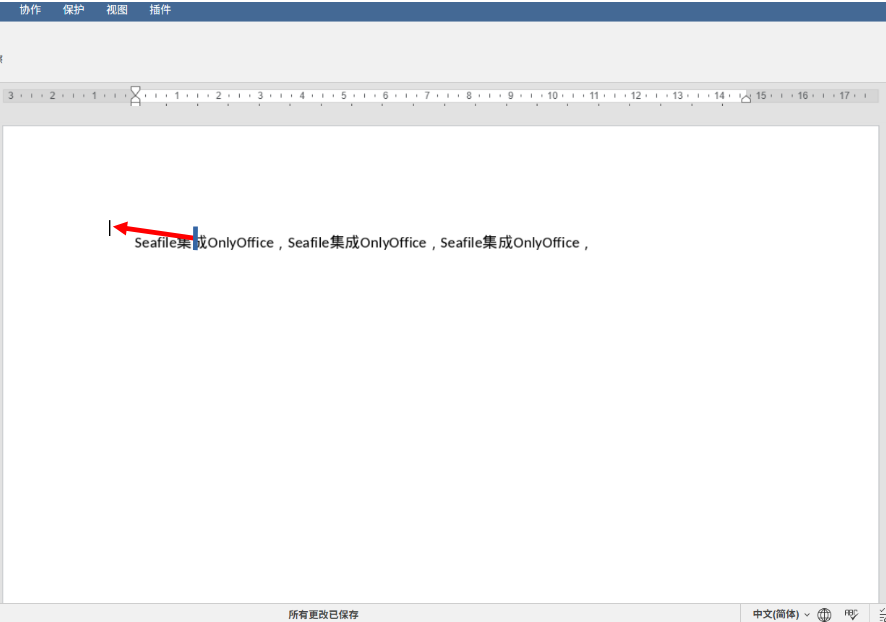
我成功部署了Seafile,并集成了OnlyOffice。但OnlyOffice会出现光标偏移 的现象(和正常的情况相比,偏左上角),请问一下这种情况怎么解决?改CSS?如果是的话应该在哪改?
djz
2026 年3 月 25 日 05:33
8
1.检查 onlyoffice 的版本是否低于 8.13,如果低于 8.13,请升级到 8.13 或更高版本。https://github.com/ONLYOFFICE/DocumentServer/issues/2859
same
2026 年3 月 25 日 05:59
9