完全按照docker方式进行部署,sdoc不可用

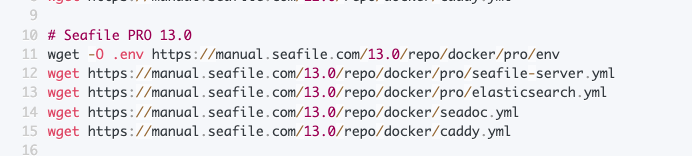
按照https://cloud.seafile.com/wiki/publish/seafile-manual/9Uue/ 说明下载了以下几个文件,并只做了必要的修改

image

同样的.yml组合文件在我的mac上docker部署sdoc是可用的,但是在ubuntu24.0上sdoc服务不可用,并报错误信息如下:

[2026-04-07 14:58:43] [ERROR] index.js[177] - Service unknown error
[2026-04-07 14:58:43] [ERROR] index.js[178] - error_type: UNKNOWN_ERROR
[2026-04-07 14:58:43] [ERROR] index.js[179] - error_message: timeout of 60000ms exceeded
[2026-04-07 14:58:43] [ERROR] index.js[180] - error_stack: AxiosError: timeout of 60000ms exceeded
at RedirectableRequest.handleRequestTimeout (/opt/sdoc-server/sdoc-server-2.0.9/sdoc-server/node_modules/axios/dist/node/axios.cjs:3365:16)
at RedirectableRequest.emit (node:events:524:28)
at Timeout. (/opt/sdoc-server/sdoc-server-2.0.9/sdoc-server/node_modules/follow-redirects/index.js:210:12)
at listOnTimeout (node:internal/timers:581:17)
at process.processTimers (node:internal/timers:519:7)
at Axios.request (/opt/sdoc-server/sdoc-server-2.0.9/sdoc-server/node_modules/axios/dist/node/axios.cjs:4483:41)
[2026-04-07 14:58:43] [ERROR] document-controller.js[56] - The content of the document loaded error
[2026-04-07 14:58:43] [ERROR] document-controller.js[74] - Load ss.sdoc(2efca3ff-c511-490f-ac7c-d064b076a935) from https://sf.scmer.cc:8443/seafhttp/files/b6ae9cd1-45d5-40b6-a678-f0d87b088cbf/ss.sdoc error

配置 https 非标准端口参考下面的流程:
1.修改 caddy.yml

services:

  caddy:
    image: ${SEAFILE_CADDY_IMAGE:-lucaslorentz/caddy-docker-proxy:2.9-alpine}
    restart: unless-stopped
    container_name: seafile-caddy
    ports:
      - 80:80
      - 5200:5200(这里修改为你的端口)
    environment:
      - CADDY_INGRESS_NETWORKS=seafile-net
...

2.如果要使用自己的证书,不使用 caddy 自动申请的 Let’s Encrypt 证书,则需要修改seafile-server.yml,否则不用修改。

services:
...
    seafile:
    image: ${SEAFILE_IMAGE:-seafileltd/seafile-pro-mc:12.0-latest}
...
    labels:
      #caddy: ${SEAFILE_SERVER_PROTOCOL:-http}://${SEAFILE_SERVER_HOSTNAME:?Variable is not set or empty}
      caddy.reverse_proxy: "{{upstreams 80}}"
      caddy: ${SEAFILE_SERVER_HOSTNAME:?Variable is not set or empty} # leave this variables only
        #caddy: seafile.xxx.org:5200 # leave this variables only
      caddy.tls: "/data/caddy/certs/cert.pem /data/caddy/certs/key.pem"
        ...

3.修改 env 文件

...
## Scheme
SEAFILE_SERVER_HOSTNAME=你的域名:你的非标准端口
SEAFILE_SERVER_PROTOCOL=https
...

非常感谢,问题已解决。

昨天晚上调整修改后(同步按照回复中的调整了3个文件),发现sdoc又不可用了,
caddy.yml

services:

  caddy:
    image: ${SEAFILE_CADDY_IMAGE:-lucaslorentz/caddy-docker-proxy:2.12-alpine}
    restart: unless-stopped
    container_name: seafile-caddy
    ports:
      - 83:83
      - 8443:8443
    environment:
      - CADDY_INGRESS_NETWORKS=seafile-net

seafile-server.yml

seafile:
    image: ${SEAFILE_IMAGE:-seafileltd/seafile-pro-mc:13.0-latest}
    container_name: seafile
    restart: unless-stopped
    # ports:
    #   - "80:80"
    volumes:
      - ${SEAFILE_VOLUME:-/opt/seafile-data}:/shared
      - "/Users/fuhongwei/docker/seafile/seafile-caddy/certs:/data/caddy/certs"

......
    labels:
      #caddy: ${SEAFILE_SERVER_PROTOCOL:-http}://${SEAFILE_SERVER_HOSTNAME:?Variable is not set or empty}
      caddy: ${SEAFILE_SERVER_HOSTNAME:?Variable is not set or empty}
      caddy.tls: "/data/caddy/certs/cert.pem /data/caddy/certs/key.pem"
      caddy.reverse_proxy: "{{upstreams 80}}"
报错信息如下:
[2026-04-09 05:57:20] [ERROR] index.js[145] - Service connection refused
[2026-04-09 05:57:20] [ERROR] index.js[146] - error_name: Error
[2026-04-09 05:57:20] [ERROR] index.js[147] - error_message: connect ECONNREFUSED 127.0.0.1:8443
[2026-04-09 05:57:20] [ERROR] index.js[148] - error_code: ECONNREFUSED
[2026-04-09 05:57:20] [ERROR] document-controller.js[56] - The content of the document loaded error
[2026-04-09 05:57:20] [ERROR] document-controller.js[74] - Load ff.sdoc(b38e2a2c-48df-4cf5-bcfc-287b37d0f229) from https://s.scmer.cc:8443/seafhttp/files/a1aece39-3368-403f-a8c5-7936d8314057/ff.sdoc error

这个域名是我本地使用 /etc/hosts 配置的,目前发现不能配置 127.0.0.1

#127.0.0.1      s.scmer.cc
10.200.90.37    s.scmer.cc

调整为网络实际的ip就又可以访问了

env 文件中的 SEAFILE_SERVER_HOSTNAME 变量即是 seafile 的访问地址。
如果要配置 https,就需要正规域名和证书,否则无法访问服务。
如果使用 http,就配置成 ip 地址即可。